How AI Restores 100-Year-Old Family Photos in Seconds
Our memories are fragile. For decades, the only way to preserve the physical snapshots of our heritage was through meticulous, expensive, and time-consuming manual restoration. But the tide is turning.
"We aren't just pixels; we're stories. AI is the bridge that keeps those stories from fading into the sepia dust of time."
The Problem with Old Photos
Physical photographs are vulnerable to humidity, light exposure, and the natural decay of organic silver halides. Cracks, silver mirroring, and extreme fading often make these heirlooms unrecognizable within just three generations.
A daguerreotype from the 1860s, a carte de visite from a great-grandparent's era, even a snapshot from the 1950s — each format has its own failure mode. Cellulose nitrate film discolors and becomes brittle. Gelatin silver prints develop foxing and yellow oxidation. Color prints from the 1970s fade asymmetrically, losing reds first and shifting toward cyan. The physical chemistry is working against the image from the moment it is made.
Manual restoration by a skilled artist can reverse much of this damage — but the process is slow, expensive, and requires exceptional skill to look convincing. A single damaged portrait can take several hours. For a family with a shoebox of old photos, that math quickly becomes prohibitive.
How ImgHarbor's AI Works
ImgHarbor's proprietary deep learning models have been trained on over 50 million pairs of damaged and pristine historical images. The system applies three interconnected restoration processes simultaneously:
Scratch Removal. The model identifies missing or corrupted pixels — whether from physical scratches on a print, dust on a negative, or deterioration of the image layer — and reconstructs them using surrounding texture as a reference. The result is indistinguishable from content that was never damaged.
Facial Reconstruction. Portraits are the most requested restoration category, and faces are the most scrutinized element in any restored image. ImgHarbor uses Generative Adversarial Networks (GANs) to sharpen eyes, lips, and facial contours that have softened or degraded over time. The model does not invent features — it recovers what was statistically likely given the surrounding information.
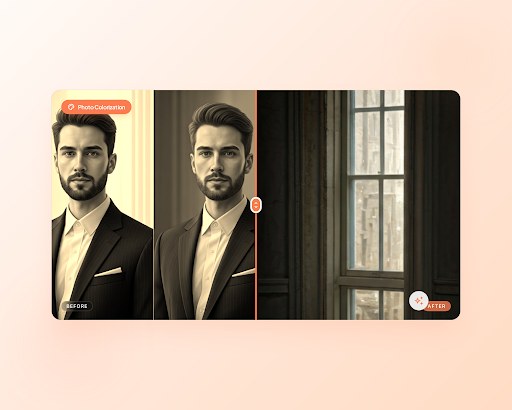
Intelligent Colorization. For photographs that started as black and white, the AI predicts accurate color assignments based on era, lighting context, skin tone ranges, and fabric patterns common to the period. The output is not a single guess but a statistically grounded colorization trained on historical photographic records.
Restoring a Photo with ImgHarbor
The full workflow takes under a minute:
Step 1 — Upload. Go to ImgHarbor's photo tools and select the restoration tool. Drag your scan or smartphone photo into the upload area. JPEG, PNG, TIFF, and HEIC are all accepted.
Step 2 — Restore. The AI processes the image in under 15 seconds. You will see the result in a split-screen editor alongside your original. The three restoration processes run in parallel — scratches, faces, and color are all handled in a single pass.
Step 3 — Share. Download the high-resolution result and share it. ImgHarbor outputs at the same resolution as your upload — no downscaling.
For batches of photos — an entire album from a grandparent's archive — ImgHarbor AI Pro handles them in sequence with consistent settings.
Getting the Best Results
A few habits on your end make the AI's job easier and the output more convincing.
Scan at high resolution. 300 dpi is a practical minimum for standard print-size photos. For smaller originals — wallet-size, passport photos — go to 600 dpi. The more pixel information the model has, the better it can distinguish original image detail from damage.
Clean the print before scanning. Dust and loose debris on the surface look like texture to the AI. A soft brush and canned air take two minutes and prevent false-positive scratch detections.
Check faces first. If skin tones look right, the rest of the image almost always follows. Use the Warmth slider to adjust if the output looks too cool or too orange.
Match the era. Pre-1950 photos typically benefit from slightly muted, warm output. 1960s and 1970s photographs can handle more saturation. Use the period as a calibration guide rather than aiming for the most vivid possible result.
Frequently Asked Questions
Is the restoration reversible?
Yes. ImgHarbor processes a copy of your uploaded file. Your original is never altered, and both the input and output are deleted from ImgHarbor's servers when your session ends.
Will it invent details that were not there?
The model reconstructs missing content based on surrounding context and statistical patterns from similar historical images. It does not add random invention — but for severely damaged areas with little surrounding context, the reconstruction is an informed estimate, not a verified recovery.
How damaged can a photo be and still get a good result?
The AI handles most common damage well: scratches, small tears, foxing, fading, and discoloration. Severely damaged photos — where large areas of the original image are completely missing — will produce a usable result, but areas with no original information will rely more heavily on reconstruction inference.
Is my photo kept private?
Uploads are transmitted over HTTPS and processed in an isolated session environment. Files are automatically deleted when your session ends. Your photos are not used for model training.
Can I restore and colorize in the same pass?
Yes. ImgHarbor's restoration engine runs scratch removal, facial reconstruction, and intelligent colorization simultaneously. A damaged black-and-white photo emerges restored and in full color in a single processing step.
What formats are supported?
Input: JPEG, PNG, TIFF, HEIC. Output: high-resolution JPEG or PNG at the same dimensions as your upload.
Is there a free trial?
Yes. New ImgHarbor accounts include a set of free trial uses. For unlimited restorations and batch processing, ImgHarbor AI Pro starts at $39.99 per month, with annual and lifetime plans available.